
Auto Shutdown Pro II4.5.5.0 - Download
You'll be able to download in few seconds.
Publisher Description
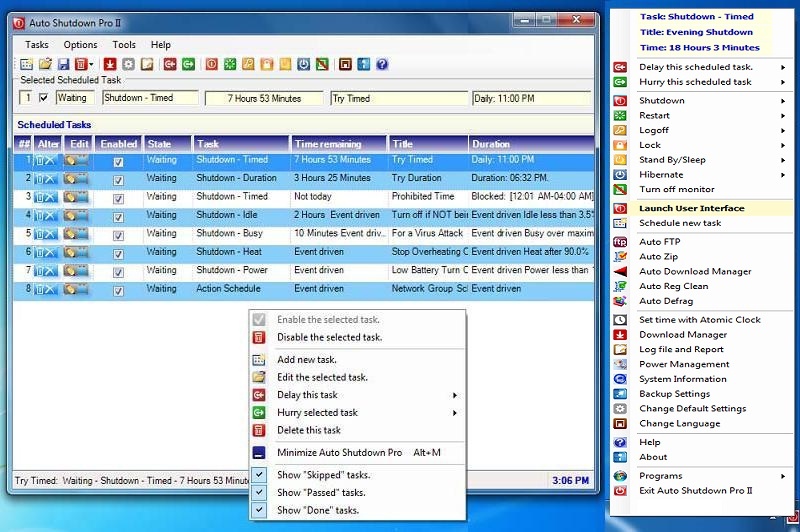
The software is an automation launcher for scheduling of multiple events to shutdown, hibernate, or sleep your computer based upon triggers of time, mouse or keyboard idle, a countdown of time, busy or idle CPU, heat, and with mobile computers battery charge. Based upon your criteria the system will eliminate your computer being left on when no one is using it. Reducing unproductive usage saves electricity and produces longer computer life. User's can set up shutdowns, hibernation, or restarts exceptions which delay till a download ends or while critical programs run. Likewise events can terminate or start programs. An optional countdown dialog enables users to skip, delay, or cancel scheduled events in the last minute before activation. Users can add or edit an unlimited number of scheduled. User's can specify specific blocks of time where no one can use their computer. This parental control keeps children off the computer after bedtime. Professionals' value blocked time because this security feature protects stored confidential documents from being stolen from their computers while away from the office even if the thief has the computer's password. Timed events can be set for daily, weekly, monthly, annually, once, and also blocked time. The following scheduled tasks are supported: Timed, duration as a countdown, idle, busy, heat, insufficient battery power, sleep, power on, restart, log off, lock, hibernate, turn off a monitor, launch or terminate any program, open and display a file, open a URL, and show a message. Network Administrators may with a single schedule hosted on their Internet web site administrate the task schedules of computer groups of any size. This software works in Windows 10, Windows 8, Windows 7, Vista, and XP, for both 32 and 64 bit environments. The software is available in 66 languages with internal tutorials. The program is perfect for work stations, laptops, notebooks, or Windows based tablets for home or office use.
About Auto Shutdown Pro II
This Automation Tools program is available in English, Albanian, Arabic, Armenian, Azerbaijani, Basque, Bengali, Catalan, Chinese, ChineseSimplified, ChineseTraditional, Croatian, Czech, Danish, Dutch, Esperanto, Estonian, Finnish, French, Galician, Georgian, German, Greek, Guarani, Gujarati, Hebrew, Hindi, Hungarian, Icelandic, Indonesian, Irish, Italian, Japanese, Kannada, Korean, Laothian, Latin, Latvian, Lithuanian, Macedonian, Malay, Maltese, Norwegian, Persian, Polish, Portuguese, Romanian, Russian, Serbian, Slovak, Slovenian, Swahili, Swedish, Tagalog, Tamil, Telugu, Turkish, Ukrainian, Urdu, Vietnamese, Welsh, Yiddish. It was last updated on 29 September, 2026. Auto Shutdown Pro II is compatible with the following operating systems: Windows.
The company that develops Auto Shutdown Pro II is Auto Shutdown Pro. The latest version released by its developer is 4.5.5.0.
The download we have available for Auto Shutdown Pro II has a file size of N/A. Just click the green Download button above to start the downloading process. The program is listed on our website since 2014-10-01 and was downloaded 0 times. We have already checked if the download link is safe, however for your own protection we recommend that you scan the downloaded software with your antivirus. Your antivirus may detect the Auto Shutdown Pro II as malware if the download link is broken.
How to install Auto Shutdown Pro II on your Windows device:
- Click on the Download button on our website. This will start the download from the website of the developer.
- Once the Auto Shutdown Pro II is downloaded click on it to start the setup process (assuming you are on a desktop computer).
- When the installation is finished you should be able to see and run the program.
Program Details
General
System requirements
Download information
Pricing
Version History
version 4.5.5.0
posted on 2014-10-01
The product offers a new event task for scheduling, a Mouse/Keyboard Idle event for shutdowns. The program no longer requires the installation of .Net Framework but rather uses the version installed on the users computer. The program no longer uses Access and thus avoids installing an Access runtime
version 2.1.1.5
posted on 2012-04-13
The program is a total new release. Newest features include warning dialogs that appear prior to heat, idle, busy, power, and blocked time events. Likewise notice of last Auto Shutdown Pro event displays for a minute after login. Update notices appear either when available, or monthly.
Disclaimer
External Download
We do not host Auto Shutdown Pro II on our servers. We did not scan it for viruses, adware, spyware or other type of malware. This app is hosted by the software publisher and passed their terms and conditions to be listed there. We recommend caution when installing it.
The external download link for Auto Shutdown Pro II is provided to you by apps112.com without any warranties, representations or guarantees of any kind, so access it at your own risk.
If you have questions regarding this particular app contact the publisher directly. For questions about the functionalities of apps112.com contact us.
